TonalEnergy Tuner & Metronome
- 4.3
- Rating
- 100.00K
- Installs
- $5.99
- Price
 Analysis by App-foxy
I came to TonalEnergy Tuner & Metronome expecting a straightforward pitch tool, but it quickly felt more like a compact practice companion for musicians. It belongs to the Music & Audio category, costs $5.99, and is made by TonalEnergy, Inc. My main impression is that it earns its place when you need to tune an instrument and then immediately work on timing, rather than opening separate tools for each job.
The app has been available since May 14, 2015, and its current version is 2.0.6. It runs on Android 7.0 or later, carries an Everyone age rating, and has passed the point where I would consider it an untested niche utility: it has more than one hundred thousand installs, a 4.3 average from roughly 2.8 thousand ratings, and 763 written reviews. Those figures do not replace hands-on judgment, but they do match my feeling that this is aimed at serious everyday practice rather than casual experimentation.
Getting past the first setup hurdles
The first place users can get stuck is assuming that a chromatic tuner will behave identically in every room and with every instrument. It will not. A phone microphone hears the instrument, the room, nearby conversations, string noise, and sometimes the sound of other players. Before judging the app, I found it much more useful to place the phone close enough to hear the instrument clearly while keeping it out of the way of the hands, bow, bell, or picking motion.
You May Also Like

 Pandora - Music & Podcasts
Pandora’s Music Is Easy to Start, but Harder to Recover
Pandora’s strength is its low-effort path from a seed to a station. Its weak spot is how much confidence it asks you to place in connection, setup, and quiet recovery.

 AccuWeather: Weather Radar
AccuWeather Review: A Quick, Clear Forecast for Everyday Decisions
For everyday plans, the best forecast is the one you can understand quickly. AccuWeather makes rain timing, radar, and local conditions easy to act on, with a few trade-offs.

 Hill Climb Racing
Why Hill Climb Racing Still Turns Crashes Into One More Run
A tiny car, a bumpy hill and one more upgrade: Hill Climb Racing keeps resurfacing because its simple chaos makes every near-miss feel personal.

 AliExpress - Shopping App
AliExpress Makes Global Shopping Feel Personal, but Shoppers Bear the Risk
AliExpress turns a global marketplace into a pocket-sized discovery engine. Its reach is useful, its shopping loop compelling, and its trade-offs easy to miss.

 Lords Mobile: Kingdom Wars
Lords Mobile Is a Kingdom-Building Routine, Not a Quick Match
A case-by-case verdict on the building, battles, device demands, and social commitments that make Lords Mobile rewarding for some players and exhausting for others.

 PDF Scanner app - TapScanner
TapScanner Makes Paperwork Easier to Capture, Check, and Share
TapScanner makes scanning with a phone feel less like a rescue operation and more like a dependable step in getting work done. Its capture tools are useful, though not flawless.
More From Our News Desk
View All News


For a single instrument, tuning in a quieter space is the obvious starting point, but the practical detail is to play one note at a time and let it settle. Plucking repeatedly while watching the display can make the result look unstable even when the instrument is fine. I get a more useful reading by producing a clean note, waiting through the initial attack, and then making a small adjustment. This matters especially with strings, where the first instant of a note can differ from its steadier pitch.
If the tuner seems not to respond, I first check the simple things: whether the phone is muted from the instrument’s position, whether another audio source is dominating the room, and whether I am playing loudly enough for the microphone to distinguish the note. A case or an awkward phone position can also make a difference. These are not glamorous fixes, but they prevent a lot of unnecessary reinstalling and blaming the app.
The most useful setup habit is to treat the tuner as a listening tool, not an automatic diagnosis. If the reading jumps, I do not immediately keep turning a peg or moving a slide. I repeat the note, reduce background sound, and compare the result with how the instrument actually feels and sounds. A display can tell me where the detected pitch is landing; it cannot decide whether I am producing the note cleanly.
How I use it before practice
My preferred routine is short. I open the tuner, check the instrument’s main reference notes, and avoid trying to correct every small movement caused by my playing technique. Once the instrument is reasonably settled, I switch to the metronome instead of leaving the tuner running while I practice. That separation keeps me focused: tuning is a preparation task, while timing is the skill I am about to work on.
This workflow is particularly sensible for beginners. New players can waste several minutes chasing a moving indicator and end up practicing less. I would rather make a careful initial adjustment, play a few notes naturally, and then start the exercise. For an experienced player, the same approach helps when warming up in an unfamiliar room or checking an instrument after carrying it between locations.
The app’s broad appeal comes from that transition between pitch and pulse. Many free alternatives specialize in one narrow job, while a physical tuner and a separate metronome add more items to a practice setup. TonalEnergy Tuner & Metronome keeps those needs together, although anyone who only wants a basic tuner may find the purchase harder to justify than a simple free option.
When the reading looks wrong
A common mistake is to assume that every unexpected note is an app failure. The instrument may be producing harmonics, an octave-related response, or an uneven attack that gives the microphone more than one clue. I handle this by playing a slower, cleaner note and checking whether the same behavior happens repeatedly. If only one playing technique causes trouble, I investigate the technique before changing the app.
Room acoustics can be surprisingly disruptive. A hard wall, a nearby instrument, or a second musician can create enough reflected sound to confuse any microphone tuner. In a rehearsal room, I try to tune away from the loudest source and ask others to pause briefly. In a bedroom or living room, moving only a short distance can improve clarity more than increasing volume.
For low instruments, I am especially patient. Low notes can take longer to stabilize and may be harder for a phone microphone to isolate. I play the note cleanly, allow it to ring, and avoid judging the first flicker of the display. If the instrument has an acoustic and an amplified output, I also compare the phone’s position with the direction of the sound rather than assuming louder always means better.
Recovering a practice session when something goes off track
The metronome is where I get the most value after tuning. Instead of starting with a demanding passage, I set a comfortable pulse and play a simple pattern against it. This exposes whether I am rushing between beats or dragging at the end of a phrase. The practical advantage of having the tuner and metronome in one app is not just convenience; it reduces the temptation to postpone timing work because changing tools feels like a separate task.
When my playing falls apart, I do not respond by immediately making the pulse faster or louder. I stop, return to a manageable speed, and reduce the passage to its rhythm. For a difficult scale, that might mean tapping or playing only the first note of each beat. For a song, I may work on the transition between two measures instead of repeating the whole piece. The app provides the reference, but the recovery method comes from how I structure the exercise.
A useful non-obvious trick is to use the metronome as a consistency test rather than background sound. I listen for whether my note begins exactly with the pulse, slightly before it, or after it. That distinction tells me what to fix. If I am always late, I may need a smaller movement or a slower change. If I rush into every beat, I may be anticipating the next note. Simply turning the metronome up does not solve either problem.
I also recommend leaving a little space between tuning and concentrated practice. The first few minutes after tuning can tempt players to keep checking the display after every phrase. That interrupts musical attention. Once I have confirmed that the instrument is in a sensible state, I put the pitch task aside and let the metronome guide the session. I return to tuning only if the sound itself suggests a real change.
What to check when the metronome seems unusable
If the pulse appears absent or difficult to hear, I check the phone’s media volume rather than only the general ring setting. I also look at the phone’s position and whether another application is producing sound. A practice room with an amplifier, headphones, or other equipment can make a metronome seem quieter than it is. These are general device checks, but they are the first things I would try before concluding that the timing tool is broken.
For group practice, I would not assume that one phone’s metronome will be enough for everyone. A drummer, brass section, or amplified band may simply overpower it. In that situation, the app still works well for individual preparation, but a louder dedicated source may be more appropriate for the full rehearsal. This is one of the clearest cases where a physical metronome or another audio setup can be better.
There is also a concentration trade-off. A combined tuner and metronome is efficient, but it can encourage constant switching between functions. I get better results when I decide in advance whether the next block is about pitch or rhythm. The app supports both jobs; it does not automatically create a disciplined practice plan.
When the phone or instrument is the real source of trouble
Some problems have little to do with TonalEnergy Tuner & Metronome. A phone microphone can be affected by lint, a blocked opening, a damaged case, or hardware that already struggles with voice recordings. I test the microphone with another ordinary recording task when the tuner behaves strangely across several instruments. If recordings also sound muffled, the sensible next step is device maintenance rather than changing tuning settings.
Battery-saving behavior, interruptions from calls, and switching between audio applications can also disturb a focused session. I prefer to prepare the phone before practice: close unrelated audio, place it securely, and avoid holding it in a way that covers the microphone. These steps are especially helpful when I am moving between tuning and rhythm work and do not want to mistake an interrupted audio path for inaccurate detection.
The instrument itself deserves equal attention. A loose string, a mouthpiece issue, an unstable bridge, or a player’s inconsistent embouchure can produce readings that move for legitimate reasons. I compare the app’s response with a sustained note and with the instrument’s normal sound. If the display changes whenever my attack changes, that is a clue to refine the note rather than a reason to keep adjusting hardware.
For beginners who are unsure how to interpret a pitch reading, a teacher remains more useful than any screen. The app can make practice more measurable, but it cannot tell whether a fingering is correct, whether a note is musically appropriate, or whether a physical problem needs repair. I see it as a reliable aid alongside instruction, not a replacement for listening and feedback.
Who benefits most from the paid model
At $5.99, the purchase makes the most sense for players who will use both sides of the app regularly. Students who practice several times a week, teachers who need a dependable personal tool, and musicians who move between home, lessons, and rehearsals are the strongest candidates. The combined design saves small amounts of time repeatedly, and those small savings add up over a long practice routine.
I would be more hesitant to recommend it to someone who tunes an instrument only occasionally. A free basic tuner may cover that need, especially if the user does not care about a built-in timing reference. Likewise, players who already own a good dedicated tuner and a loud physical metronome may gain little from adding another tool to the phone.
The app is also not my first choice for a large ensemble that needs a powerful audible pulse across a noisy room. A phone is convenient, but convenience is not the same as projection. For private practice, lessons, travel, and quiet rehearsal preparation, the format is much more convincing than it is for directing a full band.
My practical verdict after using it as a practice companion
TonalEnergy Tuner & Metronome succeeds because it connects two ordinary but important parts of practice: getting pitch under control and keeping time honest. I appreciate that it can replace the need to juggle a separate tuner and metronome, and I find the workflow more useful than the short label “tuner” suggests. The strongest results come when I use it deliberately: clean notes for detection, quiet surroundings, a clear separation between tuning and rhythm, and realistic expectations about what a phone microphone can hear.
Its limitations are equally practical. Environmental noise, unstable attacks, low notes, and weak phone audio can all make the experience feel less certain. The paid price is unnecessary for people with very occasional needs, and the phone’s sound may not be suitable for loud ensemble work. None of those points makes the app poor; they define the situations in which another solution is more sensible.
With an overall 4.3 average and more than one hundred thousand installs, it has the kind of established presence I would expect from a tool that has remained useful to many musicians. I would recommend it to a friend who wants one compact practice utility for Android and is willing to pay for a combined tuner-and-metronome workflow. I would suggest skipping it only when a free tuner is enough, when dedicated hardware already covers everything, or when the main requirement is a metronome loud enough for a full rehearsal.
My final recommendation is simple: choose it for focused individual practice, not as a universal replacement for every piece of music equipment. Used that way, it is a practical, flexible companion that helps me begin sessions faster and notice timing problems sooner, while still leaving the important musical decisions to my ears and hands.
FAQs for TonalEnergy Tuner & Metronome
01What is TonalEnergy Tuner & Metronome used for?
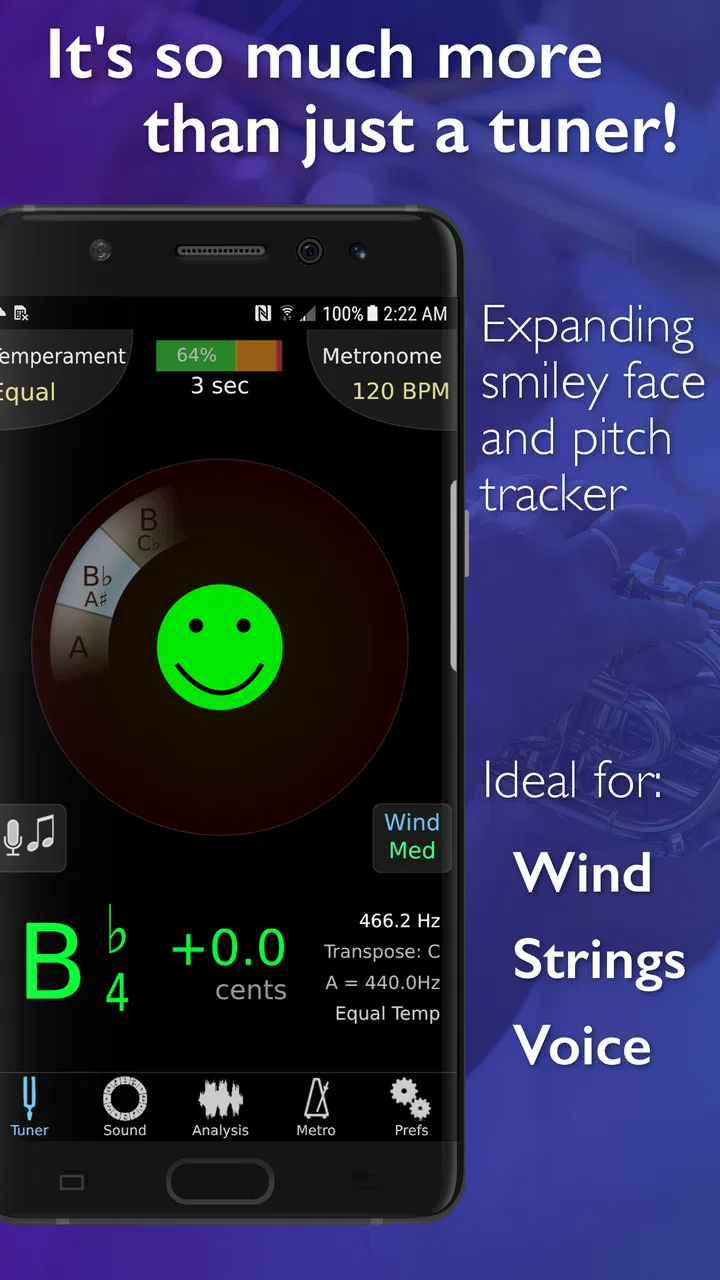
TonalEnergy Tuner & Metronome is an all-in-one practice tool for musicians. It combines a chromatic tuner, metronome, tone generator, recording features, and additional practice utilities in one app. It can be useful for beginners learning basic pitch and rhythm, as well as advanced players who need a reliable tool for daily practice, ensemble preparation, intonation work, or warm-up exercises.
02How accurate is the tuner in TonalEnergy Tuner & Metronome?
The tuner is designed to provide precise pitch feedback for a wide range of instruments, including voice, strings, winds, brass, and percussion with tonal characteristics. During testing, the visual display made it easy to see whether a note was sharp, flat, or centered. Accuracy can still depend on microphone quality, background noise, room acoustics, and the instrument being played, so quiet surroundings generally produce the best results.
03Can I customize the metronome for different practice needs?
Yes. TonalEnergy Tuner & Metronome offers extensive metronome customization rather than limiting users to a simple click track. You can adjust tempo, time signatures, subdivisions, accents, sounds, and volume, making it suitable for scales, technical exercises, odd meters, and performance preparation. Some musicians may need a little time to explore all the controls, but the flexibility is valuable once the interface becomes familiar.
04Does TonalEnergy Tuner & Metronome work without an internet connection?
The core practice functions, including tuning and metronome use, are generally designed to work offline after the app has been installed. This makes it practical for rehearsals, lessons, travel, and practice rooms where Wi-Fi or mobile data is unavailable. Features that depend on external sharing, updates, or device services may require connectivity, and performance can also vary slightly depending on the operating system and device model.
05Is TonalEnergy Tuner & Metronome suitable for beginners?
Yes, beginners can use the app, especially for learning how to tune an instrument, maintain a steady pulse, and recognize pitch accuracy. However, the large number of settings and advanced practice tools may initially feel overwhelming compared with a basic tuner or metronome. New users should start with the simplest tuner and click settings, then gradually explore tone generation, rhythm options, recording, and more specialized features.
Pros
- Accurate tuner responds quickly to subtle pitch changes.
- Metronome supports complex time signatures and custom subdivisions.
- Practice tools include tone generation
- tempo changes
- and looping.
- Clear visual feedback helps beginners understand pitch and timing.
- Works well for instrumentalists
- singers
- and ensemble practice.
Cons
- Many advanced features require a paid download or upgrade.
- The interface can feel crowded until you learn where tools are located.
- Some sounds and settings may use noticeable battery during long sessions.
- Limited device speakers can make tone-generation features less useful.
- Beginners may need time to understand the extensive customization options.

TonalEnergy Tuner & Metronome
Gallery